
Getting Started HP Notebook - Windows Vista and Windows 7

Bottom
Component Description
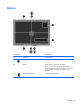
(1) Battery bay Holds the battery.
(2)
Battery cover release latch Releases the battery cover over the battery bay.
(3) Vents (2) Enable airflow to cool internal components.
NOTE: The computer fan starts up automatically to cool
internal components and prevent overheating. It is normal
for the internal fan to cycle on and off during routine
operation.
(4)
Bluetooth compartment Contains a Bluetooth device.
Bottom 15