
HP Color LaserJet CP3505 Printer - Software Technical Reference



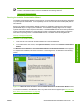
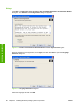
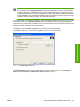


Figure 3-5 Browse for Printer dialog box
Navigate to a printer and click OK to record the path in the Network Path field in the Printer Port dialog
box. Click Cancel to close the Browse for Printer dialog box.
In the Printer Port dialog box, click Local (direct connect) port and then click Next to open the
Drivers dialog box. See
Figure 3-8 Drivers dialog box on page 84.
In the Printer Port dialog box, click New TCP/IP Port and then click Next to open the Specify TCP/IP
Port dialog box. The Specify TCP/IP Port dialog box includes all custom network ports that are available
on the local system. To use any custom network port for the customized installer, the port must be
created identically on the system where it will be used.
Figure 3-6 Specify TCP/IP Port dialog box
Click IP Address to make the field available for typing the TCP/IP address for the printer. Only numerals
are allowed in this field. If this option is selected, you must type at least one digit in the IP Address field
to prevent an error message from appearing and prompting you for a valid IP address.
82 Chapter 3 Installing Windows printing-system components ENWW
Installation in Windows