
HP Color LaserJet CP3505 Printer - Software Technical Reference

Detailed MS Windows installation instructions
This section provides information about the installation dialog box sequence for installing the HP Color
LaserJet CP3505 printing-system software in Microsoft Windows environments. You can choose to
install the software by using either a Basic, Full, or Custom Installation.
Using the Help, Back, Next, and Cancel buttons
Click the Help button on any screen where it appears to find suggestions for and explanations about
the installation process.
Click the Back button on any installation dialog box to return to the previous dialog box. The specific
dialog box depends on your previous selections.
After you select any options on a given screen, click the Next button to proceed to the next step in the
installation sequence.
To exit the installation sequence without installing the product, click the Cancel button in any installation
dialog box.
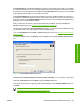
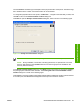
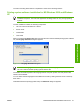
1. When you click Cancel, a dialog box opens that prompts you with this question: “Are you sure you
want to cancel the installation?”
Figure 3-15 Are you sure you want to cancel the installation?dialog box
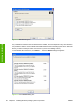
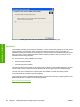
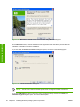
2. When you click Yes, the Cancel dialog box opens, stating that the setup was interrupted.
Figure 3-16 Cancel dialog box
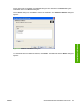
3. Click Finish to close the installation screens.
90 Chapter 3 Installing Windows printing-system components ENWW
Installation in Windows