
HP Color LaserJet CP3505 Printer - Software Technical Reference

Advanced tab features
NOTE: The Advanced tab is located on the Printing Preferences tab set . For information
about how to access these tabs, see
Printing Preferences driver tabs on page 109,
Use the Advanced tab to change the layout of printed pages. Use this tab to configure special controls
that are not commonly used, as well as to control features such as media size and copies in the driver
(although most current software programs support these features in the print dialog box or through the
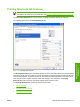
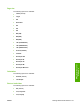
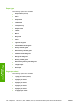
page settings in the software program). The following figure shows the Advanced tab.
Figure 4-2 The default appearance of the Advanced tab
The Advanced tab contains the following controls:
●
Paper/Output
●
Graphic
●
Document Options
Paper/Output
The Paper/Output setting contains the Copy Count setting.
ENWW Advanced tab features 113
HP print drivers for
Windows