
HP Color LaserJet CP3505 Printer - Software Technical Reference

Printer Features
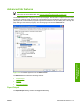
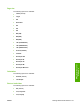
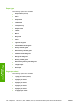
The Printer Features setting contains the following controls:
●
Print All Text as Black
NOTE: The Print All Text as Black feature is available only in the HP PCL 6 Undriver,
the HP PCL 5c Print Driver, and the PS Emulation Print Driver. It is not available in the HP
PCL 6 Black Print Driver.
The feature is Disabled by default. When Enabled is selected, the driver prints all text as black
regardless of the original document text color. Color text is printed as black, except for white text,
which remains white. (White text is a reliable method of printing reverse typeface against a dark
background.) This setting does not affect graphic images on the page, nor does it affect any text
that is part of a graphic.
●
Send True Type as Bitmap
NOTE: The Send TrueType as Bitmap option is available only in the HP PCL 6 Unidriver,
the HP PCL 6 Black Print Driver, and the HP PCL 5c Unidriver. It is not available in the PS
Emulation Print Driver.
Send True Type as Bitmap provides an alternative for software programs that have trouble using
TrueType fonts for special graphic aspects such as shading, rotation, or slanting. The setting is
Disabled (off) by default. The TrueType fonts are converted to bitmap soft fonts before
downloading. The Enabled setting causes the driver to send TrueType fonts to the printer as
outlines, which retains the standard format (outline) of the fonts.
●
Graphics Mode
NOTE: The Graphics Mode option is available only in the HP PCL 5c Print Driver. It is
not available in the HP PCL 6 Print Driver, the HP PCL 6 Black Print Driver, or the PS
Emulation Print Driver.
Use the Graphics Mode feature to select one of the following settings:
●
Send Graphics as Vector. Select this setting to send graphics to the product as a
combination of HP Graphics Language, version 2 (HP-GL/2), and raster images. This setting
might produce higher-quality output. It is the default setting.
●
Send Graphics as Raster. Select this setting to send all graphics to the product as images
composed of individual dots. This setting might improve printing speed in some cases.
●
Alternative Letterhead Mode
NOTE: The Alternative Letterhead Mode option is available only in the HP PCL 6 Print
Driver, the HP PCL 6 Black Print Driver, and the PS Emulation Print Driver. It is not available
in the HP PCL 5c Print Driver.
When selected, this option eliminates the need to flip or reload letterhead or preprinted paper in a
tray, whether you are printing on one or both sides of the sheet. Load the paper as you would for
printing on both sides. If the printer tray has an icon that indicates whether to load paper either
face-up or face-down, load the paper in opposite orientation of that shown.
ENWW Advanced tab features 117
HP print drivers for
Windows