
HP Color LaserJet CP3505 Printer - Software Technical Reference





Document preview image
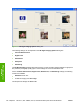
The document preview image is a line-drawn image of a page that represents graphics and text. The
document preview image is always oriented so that the contents of the page are right-side-up.
Move the cursor over the document preview image to change the cursor from an arrow to a gloved hand.
Toggle between portrait and landscape page orientation by clicking the image.
Figure 4-4 Document preview image
ENWW Printing Shortcuts tab features 123
HP print drivers for
Windows