
HP Color LaserJet CP3505 Printer - Software Technical Reference


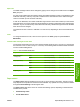


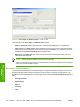
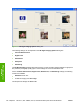

Figure 4-6 Paper Options group box
The settings in the Paper Options group box are described in the following order:
●
Page size
●
Custom Paper Size
●
Paper source
●
Paper type
●
Special pages
Page size
The Page sizesetting is a drop-down menu that lists all of the supported media sizes.
When you move the mouse over the dimensions label, the mouse cursor changes from an arrow to a
gloved hand. Click the dimensions label to toggle between English and metric units.
Because media-size settings in most software programs override driver settings, it is generally best to
use the driver to set media size only when you are printing from software programs that do not include
a media-size setting, such as NotePad, or when you are producing a book or a booklet that does not
require different media sizes.
NOTE: Certain software programs can override the size command and specify different media
sizes within a single document.
When you change the print-driver setting to a media size that is not currently loaded in the product,
a control-panel message appears that prompts you to load the media size or select another tray.
For information about media sizes, see the Media attributes on page 235 section of this STR.
ENWW Paper/Quality tab features 125
HP print drivers for
Windows