
HP Color LaserJet CP3505 Printer - Software Technical Reference




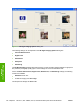

When the Settings under the Special Pages section have been changed, the Page size, Paper
source, and Paper type menus change also, offering a variety of options. For more information, see
the
Special pages on page 129 section in this chapter.
Custom Paper Size
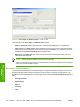
The Custom Paper Size dialog box appears when you click Custom… on the Paper/Quality tab. The
following figure shows the initial appearance of the Custom Paper Size dialog box.
Figure 4-7 Custom Paper Size dialog box
Name
Use the Name text box to type a new name for a custom media size.
The name that appears in the Name text box depends on the following conditions:
●
If a saved custom media size has been selected from the drop-down menu on the Paper/
Quality tab, then the Name text box shows the name of the selected custom media size.
●
If a standard media size has been selected on the Paper/Quality tab, then the Name text box
shows the default name of "Custom."
●
If a new name has been typed into the Name text box for the purpose of saving a new size or
renaming an existing size, then that new name will remain in the text box until the new size is saved
or the dialog box is closed.
If you type a new name into the Name text box, but then do not click Save, you can change the width
and height values without losing the name. However, if you close the dialog box without clicking Save,
any unsaved name or size values are lost without warning.
126 Chapter 4 HP PCL 6, PCL 6 Black, PCL 5, and PS emulation print drivers for Windows ENWW
HP print drivers for
Windows