
HP Color LaserJet CP3505 Printer - Software Technical Reference





●
Manual Feed in Tray 1
●
Tray 1 (100-sheet multipurpose tray)
●
Tray 2 (250-sheet tray)
●
Tray 3 (500-sheet tray, HP Color LaserJet CP3505x only)
The default setting is Automatically Select. When this setting is selected, the HP Color LaserJet
CP3505 uses the source tray that supports the media size that you have selected. If you select a source
tray other than Automatically select, make sure that the correct media size is loaded in the source
tray. For information about media sources, see the
Media attributes on page 235 section of this STR.
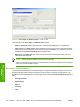
Paper type
The Paper type drop-down menu shows all of the media types that the HP Color LaserJet CP3505
supports. When you use the default setting, Unspecified, the printer uses the default media type, which
is usually Plain.
No mechanism exists for manually adding custom media types through the driver. Custom types can
be added only by using the bidirectional communication mechanism, so they must already exist in the
product when the bidirectional query occurs. If bidirectional communication is enabled, then the
information an updated list of media types is returned. If bidirectional communication is not enabled,
then the driver looks for custom media types that have been saved from a previous bidirectional
communication query, and uses those. Otherwise, no custom media types are available through the
driver.
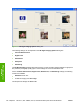
The following standard types appear in the list:
●
Unspecified
●
Plain
●
Preprinted
●
Letterhead
●
Transparency
●
Prepunched
●
Labels
●
Bond
●
Recycled
●
Color
●
Light 60-75 g/m2(16.4–20.5 lb)
●
Intermediate 90-104 g/m2 (24.7–28.5 lb)
●
Heavy 105-120 g/m2 (28.8–32.9 lb)
●
Extra Heavy 120-163 g/m2 (32.9–44.7 lb)
●
Cardstock 164-220 g/m2 (45–60.3 lb)
●
Rough
128 Chapter 4 HP PCL 6, PCL 6 Black, PCL 5, and PS emulation print drivers for Windows ENWW
HP print drivers for
Windows