
HP Color LaserJet CP3505 Printer - Software Technical Reference





●
Glossy 106-120 g/m2 (29.1–32.9 lb)
●
Heavy Glossy 120-160 g/m2
●
Extra Heavy Glossy 160-220 g/m2
The default setting is Unspecified, and the program selects the media type. If you select a different
setting, make sure that the correct media type is loaded in the tray that you selected in the Paper
source setting. For more information about media types, see the
Media attributes on page 235 section
of this STR.
When you change the print-driver setting to a media type that is not currently loaded in the product, a
control-panel message appears that prompts you to load the media type or select another tray.
Special pages
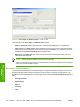
To specify special pages to be used, click the Settings button under Special Pages.
Covers
To use specify cover settings, click Covers on the Special Pages window.
Use the Covers options to include a blank or preprinted cover on a document, or to include a front/back
cover from a source tray that is different from the one used for the remainder of the document.
The following are the Covers options:
●
Cover type. Select which cover is customized: Front, Back, or Both
●
Paper source. The Paper Source setting specifies the source tray to use for adding a front and/
or back cover to the document. The list of source trays depends on the accessories that are
installed. Any optional trays that are installed through the Device Settings tab also appear here.
●
Paper type. The Paper Type setting specifies the media size to use for front and/or back covers.
Changes made to the Paper Type setting here override any previous Paper Type settings using
the same paper source.
NOTE: The Back Cover options are not available when the Booklet Printing Layout setting
is enabled on the Finishing tab. The back cover setting is unavailable, because this page would
be printed in the middle of a booklet.
NOTE: The same size of media will be used for the entire print job.
When you change the type and source of the media and covers, the settings remain configured
until you close the software program.
Print pages on different paper
Use the Print pages on different paper options to select an alternative media type or source for the
first or last page of a document.
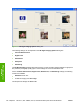
The following figure shows the Print pages on different paper settings and options.
ENWW Paper/Quality tab features 129
HP print drivers for
Windows