
HP Color LaserJet CP3505 Printer - Software Technical Reference





Switching between tabs does not change the location or appearance of the document preview image.
When you move the mouse over the document preview image, the mouse cursor changes from an arrow
to a gloved hand. You can toggle between portrait and landscape page orientation by clicking the image.
Print Quality
The Print Quality group box contains the following controls:
●
Print Quality drop-down menu
●
HP Digital Imaging
Print Quality drop-down menu
Use this control to select a print quality. Numeric values are in dots per inch (dpi). ImageREt settings
precisely control colors by combining up to 4 colors within a single dot and varying the amount of toner
in a given area to create millions of smooth colors, sharp images, and crisp text.
The Print Quality drop-down menu contains the following resolution options.
●
ImageREt 3600. This setting produces 3600 dpi color laser-class print quality. This setting is
selected by default.
●
1200 x 600. This setting is the best option for printing line images and fine text. It provides laser-
class print quality, but is slower than ImageREt 3600.
●
1200 dpi (PS Emulation Print Driver only). Prints using standard 1200 dpi resolution.
HP Digital Imaging
NOTE: The HP Digital Imaging feature is available only for the HP PCL 6 Print Driver. It is not
available for the HP PCL 6 Black Print Driver, HP PCL 5c Print Driver, or the PS Emulation Print
Driver.
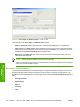
Click HP Digital Imaging to open the HP Digital Imaging Options dialog box, which is shown in the
following figure.
ENWW Paper/Quality tab features 131
HP print drivers for
Windows