
HP Color LaserJet CP3505 Printer - Software Technical Reference






●
Scale to Fit option
●
% of Normal Size setting
Actual Size
Actual Size is the default setting. It prints the document without changing the document size.
Print Document On
Click the Print Document On option to format the document for one media size and then print the
document on a different media size, with or without scaling the image to fit the new media size.
The Print Document On control is disabled by either of the following conditions:
●
The % of Normal Size value is not 100.
●
The Pages per Sheet value (on the Finishing tab) is not 1.
When Print Document On is selected, the drop-down menu shows the media sizes on which you can
print. The list contains all of the standard media sizes that the selected media source supports and any
custom sizes that you have created. When Print Document On is selected, Scale to Fit is automatically
selected. Clear this check box if you do not want your document reduced or enlarged to fit on the selected
media.
Scale to Fit
The Scale to Fit option box specifies whether each formatted document page image is scaled to fit the
target media size. By default, Scale to Fit is selected when Print Document On is selected. If the setting
is turned off, then the document page images will not be scaled, and are instead centered at full size
on the target media. If the document size is larger than the target media size, then the document image
is clipped. If it is smaller, then it is centered within the target media. The following figure shows preview
images for a document formatted for Legal-size media with the Print Document On check box selected,
and the target size specified as Letter.
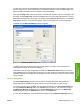
Figure 4-11 Preview images – Legal on Letter; Scale to Fit off (left) and on (right)
When the size for which the document is formatted (that is, the logical size) differs from the target size,
the preview image uses a dashed gray line to show the boundaries of the logical page in relation to the
target page size.
% of Normal Size
The % of Normal Size option provides a slider bar to use for scaling the percentage setting. The default
setting in the entry box is 100% of normal size. Normal size is defined as the media size that is selected
ENWW Effects tab features 135
HP print drivers for
Windows