
HP Color LaserJet CP3505 Printer - Software Technical Reference






●
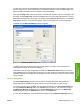
Booklet layout
●
Pages per Sheet
●
Print Page Borders
●
Page Order
Print on Both Sides
NOTE: This feature is called Print on Both Sides for the HP Color LaserJet CP3505dn and
CP3505x printers because these modesl include an automatic duplex unit. For all other printer
models, this feature is called Print on Both Sides (manually).
The default setting for the Print on Both Sides option is off (not selected). Print on Both Sides is
available when the following conditions exist:
●
Paper type on the Paper tab is set to any media type except for the following types:
●
Labels
●
Transparency
●
Envelope
●
Extra Heavy
●
Cardstock
●
Tough Paper
●
Page size is set to any media size except for the following sizes:
●
Statement
●
Envelope #10
●
Envelope DL
●
Envelope C5
●
Envelope B5
●
Envelope Monarch
●
Double Postcard (JIS)
Automatically printing on both sides
The duplexing unit in the HP Color product prints on two sides of a sheet of paper when the Print on
Both Sides option is specified in the print job. The HP Color LaserJet CP3505 printer comes with a
duplexing unit installed in the following models:
●
HP Color LaserJet CP3505dn
●
HP Color LaserJet CP3505x
These printer models support smart duplexing. The smart duplexing feature increases printing
performance by preventing one-page print jobs or single-sided pages of a duplexed print job from going
through the duplexing unit even when the duplexing feature has been selected in the driver.
142 Chapter 4 HP PCL 6, PCL 6 Black, PCL 5, and PS emulation print drivers for Windows ENWW
HP print drivers for
Windows