
HP Color LaserJet CP3505 Printer - Software Technical Reference


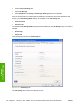


6. Click the Device Settings tab.
7. Select Job Storage.
8. Select Disabled in the Change 'Job Storage' Setting dialog box that appears.
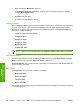
If the job-storage feature is enabled (without installing a hard disk but with at least 256 MB of total
memory), two Job Storage Mode settings are available on the Job Storage tab:
●
Proof and Hold
●
Personal Job
Two additional Job Storage Mode settings become available on the Job Storage tab if a hard disk is
installed:
●
Quick Copy
●
Stored Job
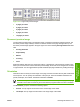
The following figure shows the Job Storage tab.
Figure 4-16 Job Storage tab
The Job Storage tab contains the following controls:
150 Chapter 4 HP PCL 6, PCL 6 Black, PCL 5, and PS emulation print drivers for Windows ENWW
HP print drivers for
Windows