
HP Color LaserJet CP3505 Printer - Software Technical Reference




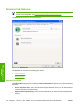

The Color Settings dialog box contains the following controls:
●
General
●
Edge Control
●
Text
●
Neutral Grays
●
Halftone
●
Graphics
●
Neutral Grays
●
Halftone
●
Photographs
●
Neutral Grays
●
Halftone
General
Use the General setting group to control Edge Control settings for all color printing.
Edge Control determines how edges are rendered. Edge Control consists of three components:
●
Adaptive Halftoning, which increases edge sharpness
●
Trapping, which reduces the effect of color plane misregistration by slightly overlapping the edges
of adjacent objects
●
Color Resolution Enhancement Technology (C-REt), which increases the apparent resolution by
placing each dot for the smoothest edges
The Edge Control option offers four settings:
●
Off. The Off setting turns Trapping, Adaptive Halftoning, and C-REt to Off.
●
Light. The Light setting provides minimal trapping. Adaptive Halftoning is set to On and C-REt is
set to On.
●
Normal. The Normal setting provides the default trapping settings. Adaptive Halftoning is set to
On, and C-REt is set to On.
●
Maximum. The Maximum setting provides the most trapping. Adaptive Halftoning is set to On,
and C-REt is set to On.
158 Chapter 4 HP PCL 6, PCL 6 Black, PCL 5, and PS emulation print drivers for Windows ENWW
HP print drivers for
Windows