
HP Color LaserJet CP3505 Printer - Software Technical Reference





Default CMYK+
HP CMYK+ technology enables a high-quality default CMYK print path. Select this option for most digital
commercial print jobs to produce optimal prints.
SWOP
This option is a common ink standard in the U.S. and other countries/regions.
Euroscale
This option is a common ink standard in Europe and other countries/regions (alsoknown as Euro
Standard).
DIC
DIC stands for Dainippon Ink and Chemical, a common ink standard in Japan and othercountries/
regions.
Custom Profile
Select this option to use a custom input profile to accurately control color output(for example, to emulate
a specific HP Color LaserJet product). Download color profiles from thefollowing Web site:
www.hp.com/go/cljcp3505_firmware
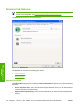
Document preview image
The document preview image is a line-drawn image of a page that represents graphics and text. The
document preview image is always oriented so that the contents of the page are right-side-up. The
document preview image appears in the upper-right corner of the following Printing Preferences driver
tabs:
●
Printing Shortcuts
●
Paper/Quality
●
Effects
●
Finishing
●
Color
Switching between tabs does not change the location or appearance of the document preview image.
When you move the mouse over the document preview image, the mouse cursor changes from an arrow
to a gloved hand. You can toggle between portrait and landscape page orientation by clicking the image.
ENWW Color tab features 161
HP print drivers for
Windows