
HP Color LaserJet CP3505 Printer - Software Technical Reference
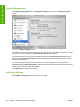







On the Restrict Color Use tab, select one of the following options:
●
Enable Color. Select this option to print all print jobs in color.
●
Color If Allowed (selected by default). Select this option to allow the user and the software program
control over whether print jobs are printed in color.
●
Disable Color. Select this option to print only in black.
Click Apply Now to save new settings.
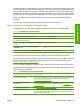
To restrict color by user, click the User tab.
To set user permissions, select a user and then, in the Default User Permissions drop-down menu,
select one of the following options:
●
Black Only
●
Color
Click Apply Now to save new settings.
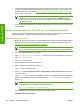
To add a new user, click Add.
Type the new user name in the User Name field.
On the Permissions drop-down menu, select one of the following options:
●
Black Only
●
Color
Click Add to add the new user.
Click Cancel to close the dialog box without adding a new user.
To restrict color usage by software program, click the Application tab on the Restrict Color Usage
screen.
To set software-program permissions, select a program and then, on the Default User Permissions
drop-down menu, select one of the following options:
●
Black Only
●
Color
Click Apply Now to save new settings.
To add a new software program, click Add.
Type the new software-program name in the Application Name field.
On the Permissions drop-down menu, select one of the following options:
●
Black Only
●
Color
Click Add to add the new software program.
Click Cancel to close the dialog box without adding a new software program.
ENWW HP Printer Utility for Macintosh 213
Installation in Macintosh