
HP Color LaserJet CP3505 Printer - Software Technical Reference







Supplies Management
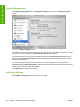
Click Supplies Management in the Configuration Settings menu to open the Replace Supplies
screen.
Figure 6-35 Replace Supplies screen
The settings on this screen prompt the printer to stop printing at a certain threshold (a specific number
of pages in the tray). By default, the Stop At Supply Out setting is selected.
To prompt the printer to stop printing at a different threshold, select Stop at Supply Low and type a
value in the Low Threshold (0-100) field. When the number of sheets in the tray reaches this value,
the printer stops printing.
You can also specify the printer behavior when the color print cartridges run out. By default, the
Continue Printing in Black-Only Mode is selected. To prompt the printer to stop instead of continuing
to print using the black cartridge, select Stop.
Click Apply Now to save the new settings.
Additional Settings
Select Additional Settings to gain access to the HP EWS.
214 Chapter 6 Macintosh software and utilities ENWW
Installation in Macintosh