
HP Color LaserJet CP3505 Printer - Software Technical Reference





Windows printing-system software features
This section contains information about the following topics:
●
Printing system and installer
●
HP LaserJet print drivers
Printing system and installer
The following sections contain information about the printing-system software and the installer on the
software CD that came with the product.
HP Color LaserJet CP3505 printing-system software CD for Windows systems
For the Microsoft Windows environment (Windows 2000, Windows XP, Windows Server 2003, and
Windows Vista), the HP Color LaserJet CP3505 printing-system software CD provides an interactive
CD browser that you can use to install the print drivers and related components, and to gain access to
online user documentation, a customization utility, Adobe® Acrobat® Reader software, and optional HP
software.
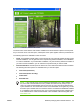
The following figure shows the main screen of the HP Color LaserJet CP3505 printing-system software
CD, which appears when you insert the printing-system software CD in a CD-ROM drive. If the screen
does not appear when you insert the software CD, follow these steps to open the CD browser:
1. Click Start.
2. Click Run.
3. Click Browse…. and navigate to the root directory of the software CD.
4. Double-click the SETUP.EXE file to start the installer.
24 Chapter 2 Software description ENWW
Software description