
HP Color LaserJet CP3505 Printer - Software Technical Reference

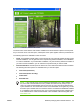




Figure 2-1 Installation software CD browser
The main screen of the software CD contains installation and documentation options in the left panel.
As you move the cursor over each option, a description of the option appears under the product banner.
The following options are available on main CD screen.
●
Install. The installation wizard guides you through the HP Color LaserJet CP3505 printing-system
software installation. You are given the choice of performing a Basic Installation, a Full Installation,
or a Custom Installation. If you select Basic Installation, only the necessary software is installed. If
you select Custom Installation, you can select the components that you want to install.
●
User Documentation. Use this option to view the HP Color LaserJet CP3505 user documentation.
The following document options are available when you click this option:
●
User Guide (Interactive)
●
User Guide (Printer Friendly)
●
Install Notes
●
Show Me How
NOTE: If the computer does not have Adobe Acrobat Reader 4.0 or later installed, click
any of the links to documentation that is in portable document format (.PDF) to open a
version of Adobe Acrobat Reader that runs from the HP Color LaserJet CP3505 printing-
system software CD. The CD Browser version of Acrobat Reader is in English only, but can
be used to open localized versions of .PDF documents. The Adobe Acrobat Reader software
is not installed on the computer and can only run while the printing-system software CD is
in the CD-ROM drive. Adobe Acrobat Reader is also available at the following Web site:
www.adobe.com.
ENWW Windows printing-system software features 25
Software description