
HP Color LaserJet CP3505 Printer - Software Technical Reference






●
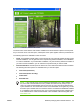
Administrator Documentation.
●
Embedded Web Server Guide
●
HP Jetdirect Guide
●
Color Printing Access and Usage
●
HP Driver Preconfiguration User Guide
●
Installer Customization Guide
●
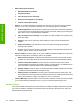
Support. To increase productivity and get the most use from your HP Color LaserJet CP3505
printer, you can view a list of links to HP Web sites. The following options are available:
●
Product Registration. Use this option to register your product online. After Web registration,
you can gain access to support and services, manage your profile, and sign up for free support
alerts, driver notices, and personalized newsletters.
●
Color Printing Access and Usage. Use this option to enable or disable color printing and to
track color usage.
●
Supplies. Click here for information about ordering HP Color LaserJet CP3505 printer
supplies.
●
Product Information. Click this option for HP Color LaserJet CP3505 printer support
information and updates.
●
hp.com. Click this link to go to the HP home Web page for information about products and
services, support, drivers, and HP online stores.
●
Optional software. Click this option to see a list of additional software available for the HP Color
LaserJet CP3505 printer. The following options are available.
●
HP Universal Print Driver. Clicking this link redirects the browser to the HP Web site that
provides more information about the HP Universal Print Driver and downloadable software.
●
Installer Customization Wizard. Use this wizard to customize the HP Color LaserJet
CP3505 installer by presetting the installation options in a response file. The installer that you
have customized can then be used for silent, unattended installation.
●
HP Web Jetadmin. Click this option to download HP Web Jetadmin software from the Web
for a Web browser-based network-management tool.
●
HP Easy Printer Care Software. Use this option to install the HP Easy Printer Care. This
printer maintenance tool helps track and maintain the printers by providing information about
status, alert notifications, usage, and supplies for one or more printers.
●
In House Marketing. Click this option to see a list of tools, templates, classes, and more to enable
you to create marketing materials in-house, to grow your business while saving money.
Installer features
The common installer is designed to provide a simple and consistent installation method for the product.
The common installer is available for the Windows 2000, Windows XP, Windows Server 2003, and
Windows Vista operating systems.
26 Chapter 2 Software description ENWW
Software description