
HP Color LaserJet CP3505 Printer - Software Technical Reference
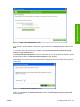


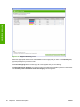


Figure 2-5 Searching for printers, please wait.. screen
When a printer has been found, one of two screens appears: the Step 2 of 3: Verify Printer Found
screen or the Step 2 of 3: Select Printers screen. The screens are shown in the following figures.
Figure 2-6 Step 2 of 3: Verify Printer Found screen
If the results do not list the printer, click Previous to search again.
If the printer that you want is listed, click Next. See
Figure 2-8 Step 3 of 3: Customize Settings
screen on page 45.
44 Chapter 2 Software description ENWW
Software description