
HP Color LaserJet CP3505 Printer - Software Technical Reference
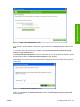


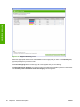


Figure 2-7 Step 2 of 3: Select Printers screen
Select the printer in the Available Printers: pane and click the green double-arrows button. The model
name moves to the Printers to Add: pane.
Click Next to add the printer. The Step 3 of 3: Customize Settings screen appears.
Figure 2-8 Step 3 of 3: Customize Settings screen
Click Alert Settings to open the Alert Settings screen.
ENWW HP Easy Printer Care 45
Software description