
HP Color LaserJet CP3505 Printer - Software Technical Reference


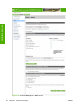

Figure 2-21 HP EWS Information tab – Configuration Page screen, 2 of 2
Settings tab
The following information is available on the HP EWS Settings tab. To view the information, click the
menu items on the left side of the HP EWS Settings tab. The Settings tab is shown in the
Configure
device on page 61 section.
Not all of the screens on the tab are shown in this document. For more information, see the HP Color
LaserJet CP3505 Embedded Web Server User Guide.
●
Configure Device. Use the Configure Device screen to print product information pages and
configure the product remotely.
●
Tray Sizes/Types. Use the Tray Sizes/Types screen to assign paper sizes and paper types for
each tray on the printer.
●
E-mail Server. Use the E-mail Server screen to configure e-mail settings for outgoing e-mail.
●
Alerts. IT administrators can configure the product to send alerts in e-mail messages to anyone.
●
AutoSend. Use the AutoSend screen to send product configuration and supplies-usage
information periodically to your service provider.
●
General Security. Use the General Security screen to manage security for the product.
●
Edit Other Links. Use the Edit Other Links screen to add or customize up to five links to the Web
sites of your choice.
60 Chapter 2 Software description ENWW
Software description