
HP Color LaserJet CP3505 Printer - Software Technical Reference



●
Device Information. Use the Device Information screen to provide a name of your choice for the
product, assign an asset number, and configure the company name, the person to contact about
the product, and the physical location of the product.
●
Language. Use the Language screen to select the language in which the HP EWS screens
appear.
●
Date & Time. Use this page to set the correct date and time for the product.
●
Wake Time. Wake time can be set to turn on the product at a certain time on a daily basis. Only
one wake-time setting can be established per day; however, each day can have a different wake
time. The sleep-mode delay can also be set on this page.
●
Restrict Color. Use the Restrict Color screen to restrict color printing for all users and software
programs or for specified users and software programs.
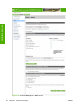
Configure device
You can obtain product configuration information through a Web browser by opening the HP EWS
screen and changing the basic configuration information on the Settings tab. Security and password
controls give management information systems (MIS) managers the level of control that they require
within their network environments. The following figure shows an example of product options that can
be configured remotely.
Figure 2-22 HP EWS Settings tab – Configure Device screen
Alerts
The product can automatically send e-mail alerts about printing problems or job status to specified e-mail
addresses. For example, if toner is low, the product can notify the person who is responsible for ordering
or changing the print cartridge. If a product failure occurs, the product can send an e-mail alert directly
to the person who is responsible for fixing the problem. These e-mail alerts can be configured to be sent
to any device that can accept e-mail, such as digital phones, pagers, and personal digital assistants
(PDAs). In large environments, administrators can route e-mail addresses to list-servers or uniform
resource locators (URLs) for expanded notification.
ENWW HP Embedded Web Server 61
Software description