
HP Color LaserJet CP3505 Printer - Software Technical Reference






NOTE: For detailed information about the Installer Customization Wizard, see the HP Device
Installer Customization Wizard, which is available at the following Web site:
www.hp.com/support/cljcp3505
Running the Installer Customization Wizard
The Installer Customization Wizard runs from the CD. It can be started from the CD browser, depending
on product-specific instantiation. It runs separately from the common Microsoft Installer (MSI) with its
own interface.
Running the Installer Customization Wizard produces one installation package and a response file
(RESPONSE.INI) for a single system installation. The installation package might work for multiple
systems that have the same response information, or the RESPONSE.INI file can be directly edited for
system-configuration differences. TheHP Device Installer Customization Wizard which provides the
exact text for replacing entries in the RESPONSE.INI file, is available at the following Web site:
www.hp.com/support/cljcp3505
To run the Installer Customization Wizard
1. Insert the HP Color LaserJet CP3505 software CD in the CD-ROM drive.
2. In the CD browser main screen, click Optional software, and then click Installer Customization
Wizard.
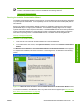
The Welcome to the HP Color LaserJet CP3505 Installation Customization Wizard screen appears.
To complete the installation, follow the instructions in the dialog boxes, as described in the following
section.
Figure 3-1 Welcome to the HP Color LaserJet CP3505 Installation Customization Wizard screen
To cancel the installation, click Cancel on this or any other screen where it appears (see
Using the Help,
Back, Next, and Cancel buttons on page 90).
ENWW General MS Windows installation instructions 79
Installation in Windows