
HP Color LaserJet CP3505 Printer - Software Technical Reference




NOTE: The customized installer limits all system installations of the product to the language
that is selected in the Language Selection dialog box. Maintenance mode on systems where
installation has been completed by using the customized installer does not provide options for
changing the language. To change the language on a system that used an Installer Customization
Wizard installation, the customized installation must be uninstalled, and a new product must be
installed in order to restore the option to install other languages.
The language that you selected is installed on users' computers regardless of the language of the text
in the dialog boxes. The Language Selection dialog box defaults to the language of the operating
system, but any language that is available on the CD can be selected for the customized installer. The
language selection is recorded in the response file.
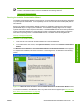
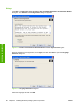
Click Next to open the Printer Port dialog box, as shown in the following figure.
Click Back on this or any screen where it appears to return to a previous screen.
Figure 3-4 Printer Port dialog box
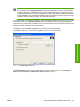
Click Network Path to make the text field available for a queue name entry. If you click Network
Path and click the Browse, the Browse for Printer dialog box opens.
ENWW General MS Windows installation instructions 81
Installation in Windows