
HP LaserJet P2010 Series - Software Technical Reference



printing specifications, such as paper size and pages per sheet. For more information, see Print Task
Quick Sets on page 78.
Resizing Options
The Resizing Options group box consists of the following controls:
●
Actual Size
●
Print Document On
●
Scale to Fit
●
% of Normal Size
Actual Size
Select this default option to print the page at normal size.
Print Document On
Select this option to format the document for one paper size and then print the document on a different
paper size, with or without scaling the image to fit the new paper size.
Print Document On is disabled by either of the following conditions:
●
The % of Normal Size value is not 100.
●
The Pages per Sheet value (on the Finishing tab) is not 1.
When Print Document On is selected, Scale to Fit is automatically selected, and the drop-down menu
shows the available media sizes. The list contains all of the standard media sizes that are supported by
the selected media source and any custom sizes that have been created.
Scale to Fit
Scale to Fit specifies whether each formatted document page is scaled to fit the target paper size. By
default, Scale to Fit is selected when Print Document On is selected. If the setting is turned off, each
document page is centered at full size on the target paper. If the document size is larger than the target
paper size, the document image is clipped. If it is smaller, it is centered within the target paper. The
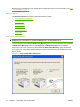
following illustration shows preview images for a document that is formatted for legal-size paper and
where the Print Document On check box is selected and the target size is specified as Letter.
Figure 4-10 Preview images - Legal on Letter; Scale to Fit off (left) and on (right)
88 Chapter 4 Host-based driver for Windows ENWW