
HP LaserJet P2010 Series - Software Technical Reference



defined printing specifications, such as paper size and pages per sheet. For more information, see Print
Task Quick Sets on page 78.
Document Options
The Document Options group box contains the following controls:
●
Print on Both Sides (Manually)
●
Flip Pages Up
●
Booklet Printing
●
Pages per Sheet
●
Print Page Borders
●
Page Order
Print on Both Sides (Manually)
NOTE: The Print on Both Sides (Manually) check box is unavailable if the Allow Manual
Duplexing option is disabled on the Device Settings tab in the Properties tab set.
The default setting for the Print on Both Sides (Manually) option is off (not selected). Selecting Print
on Both Sides (Manually) makes the Flip Pages Up and Booklet Printing options available.
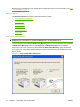
When a print job is sent to the device with the Print on Both Sides (Manually) option selected, the
even pages print, and then the following dialog box appears with instructions to complete the manual
duplex process.
Figure 4-13 Print on Both Sides Instructions
94 Chapter 4 Host-based driver for Windows ENWW