
HP LaserJet P4010 and P4510 Series Printers Embedded Web Server - User Guide


Device Information
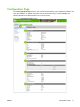
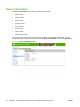
The Device Information screen shows the following information:
●
Printer name
●
Printer location
●
Asset number
●
Company name
●
Contact person
●
Product name
●
Printer model
●
Printer serial number
The product name, printer model, and printer serial number are generated automatically. You can
configure the other information on this screen from the Device Information screen on the Settings tab.
Figure 2-6 Device Information screen
18 Chapter 2 Viewing product status from the HP EWS Information screens ENWW