
HP LaserJet P4010 and P4510 Series Printers Embedded Web Server - User Guide
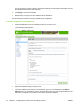
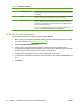
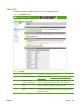
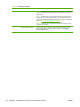
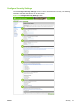
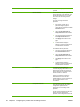

Callout Area on the screen Information or capability that the area
provides
1 Device Password Use this feature to set your password
using a maximum of 16 characters. The
device password allows you to control
who can access and change device
settings.
To assign or change the device
password:
1. If the device currently has a
password assigned, type the
current device password in the Old
Password text box.
2. Leave the New Password and
Verify Password text boxes blank.
3. Type the same device password in
the Verify Password text box.
4. Click Apply at the bottom of the
page.
5. An authorization dialog box
appears. Use the new password to
re-authenticate to the device.
To disable the device password:
1. Type the current device password
in the Old Password text box.
2. Leave the New Password and
Verify Password text boxes blank.
3. Click Apply at the bottom of the
page.
4. An authorization dialog box
appears. Use the new password to
re-authenticate to the device.
2 PJL Password PJL (Printer Job Language) is a
command language that enables some
features of the printer such as banner
pages. Setting the PJL password locks
access to these PJL features.
Set the PJL password so that only
authorized users can access PJL
enabled features. The PJL password can
be any number between 1 and
2147483647.
3 File System Password Use this feature to prevent unauthorized
users from changing any file system
configuration options and from
performing a secure storage erase
operation.
The file system password must be set to
perform a secure storage erase
operation and to configure the secure file
38 Chapter 3 Configuring the product from the Settings screens ENWW