
HP LaserJet P4010 and P4510 Series - (Multiple Language) Getting Started Guide





5
1
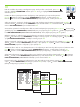
On the computer hard drive, open Applications, open Utilities, and then open Print Center. Click Add.
From the drop-down list, select the connection type.
Rendezvous: Select the product from the list. Select the printer model if one is not already selected.
IP Printing: Enter the IP address for the product. Select the printer model if one is not already selected.
OS X V10.2.8
Na tvrdom disku računala otvorite Applications (Aplikacije), zatim Utilities (Uslužni programi), a zatim
otvorite Print Center (Centar za ispis). Pritisnite Add (Dodaj). Iz padajućeg popisa odaberite vrstu veze.
Rendezvous: S popisa odaberite uređaj. Ukoliko već nije odabran, odaberite model pisača.
IP ispis: Upišite IP adresu uređaja. Ukoliko već nije odabran, odaberite model pisača.
Na pevném disku počítače otevřete položku Applications (Aplikace), Utilities (Obslužné programy) a Print Center
(Tiskové centrum). Klepněte na tlačítko Add (Přidat). Z rozevíracího seznamu vyberte typ připojení.
Rendezvous: Ze seznamu vyberte zařízení. Vyberte model tiskárny, pokud ještě není vybrán.
IP Printing: Zadejte adresu IP zařízení. Vyberte model tiskárny, pokud ještě není vybrán.
A számítógép merevlemezén nyissa meg az Applications (Alkalmazások), majd a Utilities (Segédprogramok), végül
a Print Center (Nyomtatóközpont) elemet. Kattintson az Add (Hozzáadás) gombra. A legördülő listából válassza ki
a csatlakozás típusát.
Rendezvous: Válassza ki a terméket a listából. Ha még nincs kiválasztva nyomtatótípus, válasszon ki egyet.
IP-nyomtatás: Adja meg a termékhez tartozó IP-címet. Ha még nincs kiválasztva nyomtatótípus, válasszon ki egyet.
Na dysku twardym komputera otwórz kolejno teczki Applications (Programy) i Utilities (Narzędzia), a następnie
uruchom program Print Center (Centrum drukowania). Kliknij przycisk Add (Dodaj). Z listy rozwijanej wybierz typ
połączenia.
Rendezvous: Wybierz urządzenie z listy. Wybierz model drukarki, jeśli nie jest jeszcze wybrany.
IP Printing (Drukowanie IP): Wprowadź adres IP urządzenia. Wybierz model drukarki, jeśli nie jest jeszcze
wybrany.
De pe hard discul calculatorului, deschideţi Applications (Aplicaţii), deschideţi Utilities (Utilitare) şi apoi deschideţi
Print Center (Centru de imprimare). Faceţi clic pe Add (Adăugare). Selectaţi tipul de conexiune din lista verticală.
Rendezvous: Selectaţi din listă echipamentul. Dacă nu este deja detectat, selectaţi modelul de imprimantă.
Imprimare IP: Introduceţi adresa IP a produsului. Dacă nu este deja detectat, selectaţi modelul de imprimantă.
Na čvrstom disku računara otvorite fasciklu Applications (Aplikacije), fasciklu Utilities (Uslužni programi), a zatim
otvorite fasciklu Print Center (Centar za štampanje). Kliknite na dugme Add (Dodaj). Izaberite tip veze sa padajuće
liste.
Rendezvous: Izaberite željeni uređaj sa liste. Izaberite model štampača ako već nije izabran.
IP adresa štampača: Unesite IP adresu uređaja. Izaberite model štampača ako već nije izabran.
Na pevnom disku počítača otvorte položku Applications (Aplikácie), otvorte položku Utilities (Pomocné programy)
a potom otvorte položku Print Center (Centrum tlače). Kliknite na tlačidlo Pridať. Z rozbaľovacieho zoznamu
vyberte typ pripojenia.
Rendezvous: Produkt vyberte zo zoznamu. Vyberte model tlačiarne, ak už nie je zvolený.
IP tlače: Zadajte IP adresu produktu. Vyberte model tlačiarne, ak už nie je zvolený.
Na trdem disku računalnika odprite Applications (Aplikacije), Utilities (Pripomočki) in nato Printer Center (Tiskalni
center). Kliknite Add (Dodaj). Na spustnem seznamu izberite vrsto povezave.
Rendezvous: Na seznamu izberite napravo. Izberite model tiskalnika, če še ni izbran.
IP Printing (Tiskanje prek protokola IP): Vnesite IP-naslov za napravo. Izberite model tiskalnika, če še ni izbran.