
HP LaserJet P4010 and P4510 Series - Software Technical Reference



Install optional software
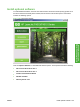
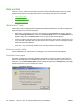
To install additional software, insert the HP LaserJet P4010 and P4510 Series printing-system CD. If
the driver software has already been installed, the CD browser main window opens. This window
includes the following options:
Figure 3-45 CD browser window
Click the Optional Software to view additional software options. These options include the following:
●
HP Universal Print Driver PCL 6
●
HP Universal Print Driver PCL 5
●
Installer Customization Wizard
●
HP Web Jetadmin
●
HP Easy Printer Care
ENWW Install optional software 109
Install Windows printing-
system components