
HP LaserJet P4010 and P4510 Series - Software Technical Reference

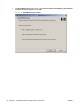

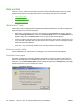

4. The Important Uninstall Information dialog box appears. Click Continue.
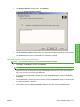
5. The Cleanup progress dialog box appears. The progress bar reflects the status of the uninstall
process.
6. When the uninstall process is completed, the Restart dialog box appears. Click Restart to restart
your computer and finish the uninstall process.
Use the printing-system software CD
1. Quit all open programs.
2. Insert the printing-system software CD into the CD-ROM drive. After the system is checked, the
Home dialog box appears.
Figure 3-46 Home dialog box
3. Click Modify Installation.
ENWW User uninstall software 111
Install Windows printing-
system components