
HP LaserJet P4010 and P4510 Series - Software Technical Reference
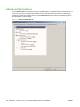
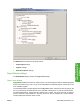
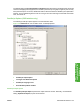
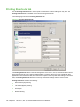
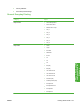
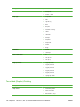

Figure 4-3 Advanced tab (PS)
The Advanced tab contains the following controls:
●
Paper/Output settings
●
Graphic settings
●
Document Options settings
Paper/Output settings
The Paper/Output setting contains the Copy Count settings.
Copy Count setting
Copy Count specifies the number of copies to print. This driver setting is useful for software programs
that do not provide a copy count. If a copy count is available in the software program, set the copy count
in the software program.
The requested number of copies appears in the Copy Count option. Select the number by typing in the
box or by using the up and down arrows on the right side of the text box. For the HP LaserJet P4010
and P4510 Series printer, valid entries are numbers from 1 to 9999. The copies value will not advance
from the maximum number (9999) to 1 when the up arrow is used, or change from 1 to the maximum
number (9999) when the down arrow is used.
ENWW Advanced tab features 121
HP PCL 5, PCL 6, and PS
emulation drivers for
Windows