
HP LaserJet P4010 and P4510 Series - Software Technical Reference
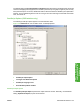
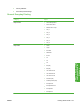
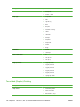

To create a file that conforms to the Adobe Document Structuring Conventions (ADSC), click Optimize
for Portability. Each page of the document will be a self-contained object. This is useful when creating
a PS file and print it on a different printer. To include the file as an image in another document that is
printed from a different software program, click Encapsulated PostScript (EPS). The Archive
Format creates a PS file that can be used later.
TrueType Font Download option
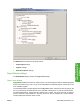
The TrueType Font Download Option specifies how TrueType fonts are downloaded. The default
setting of Automatic allows the PS driver to decide which format is best.
●
To download the TrueType font as a scalable outline font, click Outline.
●
To download the TrueType font as a bitmap font, click Bitmap.
●
If the printer is a TrueType rasterizer printer, click Native TrueType to download the TrueType font
as an outline font.
PostScript Language Level
The PostScript Language Level option specifies which PS language level to use, from 1 to 3. The
highest level supported by the HP LaserJet P4010 and P4510 Series printer is 3, and this is the default
setting. Some printers support multiple levels.
It is usually best to select the highest number available, because a higher language level provides more
features. In some instances level 1 should be used, such as when printing a file to disk, and that file will
be printed by someone who uses a level-1 printer.
Send PostScript Error Handler
The Send PostScript Error Handler setting specifies whether a PS error-handler message is sent. To
get the printer to print an error page when an error occurs in the print job, click Yes. The default setting
is Yes.
Printer Features
The following Printer Features are available:
●
Send TrueType as Bitmap (HP PCL 6 only)
●
Resolution Enhancement technology (REt)
●
Raster Compression (PCL 6 only)
●
Alternative Letterhead Mode
Send TrueType as Bitmap (HP PCL 6 only)
Send TrueType as Bitmap provides an alternative for those software programs that encounter
problems when TrueType fonts are used for special graphic purposes such as shading, rotation, or
slanting. The setting is Disabled (off) by default. The TrueType fonts are first converted to bitmap soft
fonts before downloading. The Enabled setting causes the driver to send TrueType fonts to the printer
as outlines, which retains the standard format (outline) of the fonts.
124 Chapter 4 HP PCL 5, PCL 6, and PS emulation drivers for Windows ENWW