
HP LaserJet P4010 and P4510 Series - Software Technical Reference
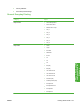
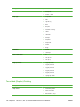

Printing Shortcuts tab
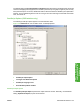
Use the Printing Shortcuts tab to store specific combinations of driver settings for easy use. The
Printing Shortcuts tab is available on the driver Printing Preferences.
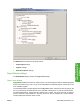
The following figure shows the Printing Shortcuts tab.
Figure 4-5 Printing Shortcuts tab
The Printing Shortcuts tab is a new tab that appears on the PCL 6, PCL 5, and PS emulation drivers
beginning with the HP Color LaserJet CM4730 MFP. In previous drivers, the Print Task Quick Sets
appeared in most of the driver tabs, and was used to capture commonly used driver settings. Like Quick
Sets, the Printing Shortcuts tab saves commonly used driver settings under a shortcut name.
Printing Shortcuts contains the following:
●
General Everyday Printing
●
Two-sided (Duplex) Printing
●
Envelopes
●
Booklet Printing
126 Chapter 4 HP PCL 5, PCL 6, and PS emulation drivers for Windows ENWW