
HP LaserJet P4010 and P4510 Series - Software Technical Reference
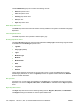
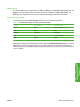
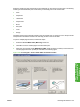
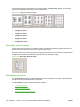

The document preview image reflects any changes made in the Page order settings. The following
figure shows the different document preview configurations.
Figure 4-23 Page-order preview images
●
2 pages per sheet
●
4 pages per sheet
●
6 pages per sheet
●
9 pages per sheet
●
16 pages per sheet
Document preview image
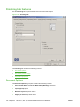
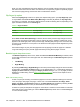
The document preview image is a line-drawn image of a page that represents graphics and text. It is
always oriented so that the contents of the page are right-side-up.
Move the cursor over the document preview image to change the cursor from an arrow to a gloved hand.
Toggle between portrait and landscape page orientation by clicking the image.
Figure 4-24 Document preview image
Orientation group box
Use the Orientation setting to establish different layouts of the image on the page. This setting does
not affect the way that media feeds into the printer.
The Orientation group box contains the following options:
●
Portrait option button
●
Landscape option button
●
Rotate by 180 degrees check box
158 Chapter 4 HP PCL 5, PCL 6, and PS emulation drivers for Windows ENWW