
HP LaserJet P4010 and P4510 Series - Software Technical Reference


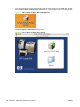

2. If the CD screen does not open automatically when the CD is put into the CD-ROM drive, double-
click the HP LJ P4010 or P4510 Series CD-ROM icon on the desktop to open the installer folder.
Figure 5-1 HP LJ P4010 or P4510 Series CD-ROM icon
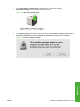
The HP LJ P4010 or P4510 Series dialog opens.
Figure 5-2 HP LJ P4010 or P4510 Series dialog
196 Chapter 5 Macintosh Software and Utilities ENWW