
HP LaserJet P4010 and P4510 Series - Software Technical Reference
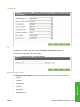


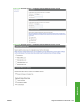
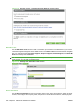

An example of the Embedded Jetdirect Menu main menu is as follows.
Figure 5-47 Configure Device – I/O menu options – Embedded Jetdirect menu
Resets
The Resets menu allows you to Restore Factory Default Settings and also allows you to enable or
disable Sleep Mode.
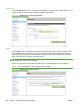
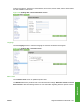
An example of the Resets menu is as follows.
Figure 5-48 Configure Device – Resets menu
Diagnostics
Use the Diagnostics menu to preform basic troubleshooting procedures.
The Diagnostics menu consists of a main menu and thePaper Path Test submenu.
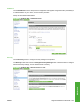
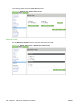
An example of the Diagnostics main menu is as follows.
Figure 5-49 Settings tab – Diagnostics menu
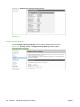
Paper Path Test
Use the Paper Path Test submenu to select options for and to complete a paper path test.
230 Chapter 5 Macintosh Software and Utilities ENWW