
HP LaserJet P4010 and P4510 Series - Software Technical Reference
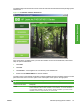
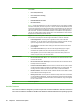



The common installer offers the following features:
●
The HP LaserJet P4010 and P4510 Series printing-system software CD features an interactive
software interface.
●
Network connection is integrated so that you can install drivers and connect to a networked device
in a single process.
●
The Selection dialog box sets the operating-system language as the default language (Microsoft
Windows XP, Windows 2000, Windows Server 2003 only). Use the installer to select any of the
languages on the HP LaserJet P4010 and P4510 Series printing-system software CD.
The HP LaserJet P4010 and P4510 Series printing-system software CD also includes the following
features:
●
HP LaserJet Uninstaller Utility
●
HP Customization Utility for custom installations
All of the MS Windows system components are installed by using the HP LaserJet P4010 and P4510
Series printing-system installer. The installer automatically detects the language of choice and the
operating system. Select from the following types of installation:
●
Basic Installation
●
Full Installation
●
Custom Installation
HP LaserJet P4010 and P4510 Series print drivers
HP LaserJet P4010 and P4510 Series print drivers provide the printing features and communication
between the computer and the printer. The printing system includes software for end users and network
administrators who are working in the following operating environments:
●
Microsoft Windows 2000, Windows XP (32-bit and 64-bit), Windows Server 2003 (32-bit and
64-bit), Windows Vista (32-bit and 64-bit)
Microsoft Windows 64-bit drivers for Microsoft Windows XP and Windows Server 2003 are
available for the following systems:
◦
AMD Athlon 64, AMD Opteron, Intel Xeon, or Pentium 4 with EMT64
●
Apple Mac X (V10.2.8 or later)
NOTE: For the latest information about the printing-system software components, see the readme
files on the CD. For additional information about installing the printing-system software, see the
HP LaserJet P4010 and P4510 Series Printer Install Notes on the printing-system software CD.
All of the drivers provide access to paper-handling and print-quality features.
Topics:
●
Select the best print driver
●
HP print drivers
●
Driver version numbers for MS Windows operating systems
ENWW Windows printing-system software 21
Software Description