
HP LaserJet P4010 and P4510 Series - Software Technical Reference


Modify Installation
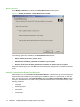
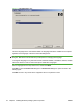
When Modify Installation is selected, the Setup Maintenance window opens.
Figure 3-2 Modify Installation – Setup Maintenance window
The following options are available on the Setup Maintenance window:
●
Add an additional printer or printer driver
●
Add HP LaserJet P4010_P4510 Series software to your system
●
Remove all HP LaserJet P4010_P4510 Series software or drivers from your system
Select the desired option, then click Next. Follow all subsequent dialog boxes to complete the desired
result.
Installer Customization Wizard for Windows
Administrators can use the Installer Customization Wizard to customize the HP LaserJet P4010 and
P4510 Series printer installer by preconfiguring the installation options in a response file. To start the
utility, from the main menu, click Option Software, then click Installer Customization Wizard. Using
this option, administrators can create a silent (unattended) installer that is customized with any of the
following selections:
●
Language
●
Operating system
●
Print drivers
●
Components
74 Chapter 3 Installing Windows printing-system components ENWW