
HP LaserJet P4010 and P4510 Series - User Guide



Lock the control panel menus
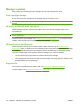
You can lock various menus on the control panel by using the embedded Web server.
1. Open the embedded Web server by entering the product IP address into the address line of a Web
browser.
2. Click Settings, and then click Security.
3. Click Configure Security Settings.
4. In the area for Control Panel Access Lock, select the level of security that you want.
Security level Locked menus
Minimum
●
The RETRIEVE JOB menu requires a PIN for access.
●
The CONFIGURE DEVICE menu, SYSTEM SETUP submenu is locked.
●
The CONFIGURE DEVICE menu, I/O submenu is locked.
●
The CONFIGURE DEVICE menu, RESETS submenu is locked.
Moderate
●
The RETRIEVE JOB menu requires a PIN for access.
●
The CONFIGURE DEVICE menu is locked (all submenus).
●
The DIAGNOSTICS menu is locked.
Intermediate
●
The RETRIEVE JOB menu requires a PIN for access.
●
The PAPER HANDLING menu is locked.
●
The CONFIGURE DEVICE menu is locked (all submenus).
●
The DIAGNOSTICS menu is locked.
Maximum
●
The RETRIEVE JOB menu requires a PIN for access.
●
The INFORMATION menu is locked.
●
The PAPER HANDLING menu is locked.
●
The CONFIGURE DEVICE menu is locked (all submenus).
●
The DIAGNOSTICS menu is locked.
5. Click Apply.
114 Chapter 9 Manage and maintain the product ENWW