
HP LaserJet P4010 and P4510 Series - User Guide




Replace supplies and parts
Supply replacement guidelines
Keep the following guidelines in mind when setting up the product.
●
Sufficient space is required above and in the front of the product for removing supplies.
●
The product should be located on a flat, sturdy surface.
NOTE: Hewlett-Packard recommends the use of HP supplies in this product. Use of non-HP supplies
can cause problems requiring service that is not covered by the HP warranty or service agreements.
Change the print cartridge
When a print cartridge approaches the end of useful life, a message appears on the control panel
recommending that you order a replacement. The product can continue to print using the current print
cartridge until a message appears instructing you to replace the cartridge.
Continue printing with the current cartridge until redistributing the toner no longer yields acceptable
print quality. To redistribute the toner, remove the toner cartridge from the printer and gently rock the
cartridge back and forth about its horizontal axis. For graphical representation, see cartridge
replacement instructions. Reinsert the toner cartridge into the printer and close the cover.
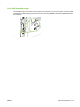
1. Open the top cover.
2. Remove the used print cartridge from the product.
ENWW Replace supplies and parts 117