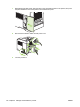
7. Reinstall the right-side panel. Align the tabs on the panel with the slots in the product, and push
the panel toward the front of the product until it latches into place.
8. Reconnect the interface cables and the power cord.
9. Turn the product on.
130 Chapter 9 Manage and maintain the product ENWW