HP LaserJet P4010 and P4510 Series - User Guide
Manuals
Brands
HP Manuals
Print & Scan
CB509A
11
12
13
14
15
16
17
18
19
20
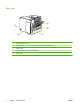
Rear view
1
2
3
4
5
1
Rear output bin (pull to open)
2
Duplex access
ory cover
(remove this
to install t
he duplex
printing accesso
ry)
3
Interface ports
4
Right cover
(provides ac
cess to t
he DIMM slot
)
5
On/o
ff switch
8
Chapte
r 1 P
roduct b
asics
ENWW
1
...
...
18
19
20
21
22
...
...
246