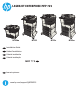
LASERJET ENTERPRISE MFP 725 M725dn EN Installation Guide FR Guide d'installation ES Guía de instalación PT Guia de instalação M725f HE ES Lea esto primero www.hp.
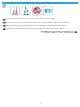
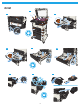
1 EN Select a sturdy, well-ventilated, dust-free area, away from direct sunlight to position the product. FR Choisissez un support solide et un endroit propre, bien aéré et à l'abri du rayonnement direct du soleil pour placer votre produit. ES Busque una superficie sólida en un lugar bien ventilado, sin polvo y alejado de la luz solar directa para colocar el producto. PT Escolha um local firme, bem ventilado, sem poeira e longe da exposição direta à luz do sol para instalar o dispositivo.
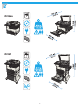
2 LASER JET ENTER PRISE 700 M725dn M725f EN EN EN EN EN EN EN EN EN EN EN EN M725dn Installatio n Installatio Guide n Installatio Guide n Installatio Guide n Installatio Guide n Installatio Guide n Installatio Guide n Installatio Guide n Installatio Guide n Installatio Guide n Installatio Guide n Installatio Guide n Guide MFP M725f EN EN EN EN EN EN EN EN EN EN EN ES Lea esto EN EN EN EN EN EN EN EN EN EN EN M725dn Installatio n Installatio Guide n Installatio Guide n Installatio Guide n Installat
M725z LASER JET ENTER PRISE 700 EN EN EN EN EN EN EN EN EN EN EN EN MFP M725dn Installatio n Installatio Guide n Installatio Guide n Installatio Guide n Installatio Guide n Installatio Guide n Installatio Guide n Installatio Guide n Installatio Guide n Installatio Guide n Installatio Guide n Installatio Guide n Guide M725f EN EN EN EN EN EN EN EN EN EN EN ES Lea esto M725z Installatio n Installatio Guide n Installatio Guide n Installatio Guide n Installatio Guide n Installatio Guide n Installatio G
3 M725dn 3.2 3.3 3.5 3.6 3.1 3.4 3.
M725f 3.2 3.1 3.3 3.5 3.4 3.7 3.6 3.8 3.
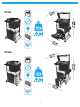
M725z 3.2 3.1 3.4 3.7 3.3 3.6 3.5 3.
M725z+ 3.2 3.1 3.3 3.5 3.4 3.6 3.7 3.
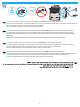
4 1 EN 1) If you are connecting to a network, connect the network cable now. Caution! Do not connect the USB cable now. 2) If you are using the fax feature, connect the fax cable to a fax or phone line (all models except M725dn). A country/region specific adapter for the RJ11 telephone cord might be required to connect to the telephone jack. NOTE: The M725dn requires a fax card accessory to set up the fax feature. FR 1) Si vous vous connectez à un réseau, branchez le câble réseau maintenant.
5 EN Connect the power cable between the product and a grounded ac outlet. Turn on the product. On the control panel, set the language, the keyboard layout, the date/time format, and the time zone. When the Home screen appears, touch Initial Setup to enable basic product functions. NOTE: For advanced setup, enter the product IP address in the address bar of a Web browser after software installation is complete. CAUTION: Make sure your power source is adequate for the product voltage rating.
6 6.2 6.1 6.3 6.4 6.5 6.6 EN The default paper orientation shown here, with the short edge toward the front of the tray, results in the best printing performance. FR L'orientation de papier par défaut illustrée ici, avec le bord court vers l'avant du bac, permet d'obtenir les meilleures performances d'impression. ES La orientación del papel predeterminada que se muestra aquí, con el borde corto hacia la parte frontal de la bandeja, es la mejor manera de imprimir.
7 EN Mac: Connect the USB cable now. Windows: Do not connect the USB cable until prompted during the software installation in the next step. Windows and Mac: When the product is connected with a USB cable, the software installation process requires that the product is turned on and in the Ready state.
8 EN Download or locate the driver software installation files Method 1: Download from Product Support Web Site (Windows and OS X) 1. Go to www.hp.com/support/ljMFPM725. 2. Select software and drivers. 3. Download the software for your printer model and operating system. 4. Launch the installation file by clicking on the .exe or .zip file as necessary. PT Method 2: Install from the printer CD (Windows only) Insert the printer CD into the computer and follow the on-screen instructions.
9 EN For more information, see the User Guide on the printer CD or go to www.hp.com/support/ljMFPM725. Press the Help button on the printer control panel to access Help topics. FR Pour plus d'informations, consultez le manuel de l'utilisateur sur le CD de l'imprimante ou visitez la page www.hp.com/support/ljMFPM725. Appuyez sur le bouton Aide sur le panneau de commande de l'imprimante pour accéder aux rubriques d'aide.
14
www.hp.com Copyright and License Copyright et licence © 2015 Copyright HP Development Company, L.P. © 2015 Copyright HP Development Company, L.P. Reproduction, adaptation or translation without prior written permission is prohibited, except as allowed under the copyright laws. La reproduction, l'adaptation ou la traduction de ce document sans l'autorisation écrite préalable de HP est interdite, sauf dans des conditions conformes aux lois relatives au copyright.