
Cisco Gigabit Ethernet Switch Module for HP BladeSystem p-Class Command Reference Guide


2-293
Cisco Gigabit Ethernet Switch Module for the HP p-Class BladeSystem Command Reference Guide
380265-003
Chapter 2 CGESM Switch Cisco IOS Commands
show boot
show boot
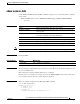
Use the show boot privileged EXEC command to display the settings of the boot environment variables.
show boot [ | {begin | exclude | include} expression]
Syntax Description
Command Modes Privileged EXEC
Command History
Usage Guidelines Expressions are case sensitive. For example, if you enter | exclude output, the lines that contain output
are not displayed, but the lines that contain Output are displayed.
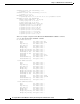
Examples This is an example of output from the show boot command. Table 2-15 describes each field in the
display.
Switch# show boot
BOOT path-list : flash:cgesm-i6l2-mz.122-25.SE1/cgesm-i6l2-mz.122-25.SE1.bin
Config file : flash:/config.text
Private Config file : flash:/private-config.text
Enable Break : yes
Manual Boot : no
HELPER path-list :
Auto upgrade : yes
| begin (Optional) Display begins with the line that matches the expression.
| exclude (Optional) Display excludes lines that match the expression.
| include (Optional) Display includes lines that match the specified expression.
expression Expression in the output to use as a reference point.
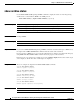
Release Modification
12.2(25)SE1 This command was introduced.
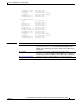
Table 2-15 show boot Field Descriptions
Field Description
BOOT path-list Displays a semicolon separated list of executable files to try to load and execute when
automatically booting up.
If the BOOT environment variable is not set, the system attempts to load and execute
the first executable image it can find by using a recursive, depth-first search through the
flash file system. In a depth-first search of a directory, each encountered subdirectory
is completely searched before continuing the search in the original directory.
If the BOOT variable is set but the specified images cannot be loaded, the system
attempts to boot the first bootable file that it can find in the flash file system.
Config file Displays the filename that Cisco IOS uses to read and write a nonvolatile copy of the
system configuration.