
Cisco Gigabit Ethernet Switch Module for HP BladeSystem p-Class Command Reference Guide


2-294
Cisco Gigabit Ethernet Switch Module for the HP p-Class BladeSystem Command Reference Guide
380265-003
Chapter 2 CGESM Switch Cisco IOS Commands
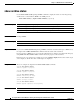
show boot
Related Commands
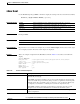
Private Config file Displays the filename that Cisco IOS uses to read and write a nonvolatile copy of the
system configuration.
Enable Break Displays whether a break during booting up is enabled or disabled. If it is set to yes, on,
or 1, you can interrupt the automatic bootup process by pressing the Break key on the
console after the flash file system is initialized.
Manual Boot Displays whether the switch automatically or manually boots up. If it is set to no or 0,
the bootloader attempts to automatically boot up the system. If it is set to anything else,
you must manually boot up the switch from the bootloader mode.
Helper path-list Displays a semicolon separated list of loadable files to dynamically load during the
bootloader initialization. Helper files extend or patch the functionality of the
bootloader.
NVRAM/Config file buffer size Displays the buffer size that Cisco IOS uses to hold a copy of the configuration file in
memory. The configuration file cannot be larger than the buffer size allocation.
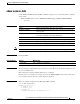
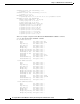
Table 2-15 show boot Field Descriptions
Field Description
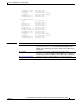
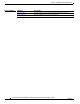
Command Description
boot config-file Specifies the filename that Cisco IOS uses to read and write a nonvolatile
copy of the system configuration.
boot enable-break Enables interrupting the automatic bootup process.
boot manual Enables manually booting up the switch during the next bootup cycle.
boot
private-config-file
Specifies the filename that Cisco IOS uses to read and write a nonvolatile
copy of the private configuration.
boot system Specifies the Cisco IOS image to load during the next bootup cycle.