
Cisco Gigabit Ethernet Switch Module for HP BladeSystem p-Class Command Reference Guide


2-326
Cisco Gigabit Ethernet Switch Module for the HP p-Class BladeSystem Command Reference Guide
380265-003
Chapter 2 CGESM Switch Cisco IOS Commands
show env
show env
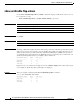
Use the show env user EXEC command to display fan and temperature information for the switch.
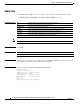
show env {all | fan | temperature} [ | {begin | exclude | include} expression]
Syntax Description
Note Though visible in the command-line help strings, the power, and rps keywords are not supported.
Command Modes User EXEC
Command History
Usage Guidelines Expressions are case sensitive. For example, if you enter | exclude output, the lines that contain output
are not displayed, but the lines that contain Output are displayed.
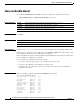
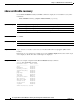
Examples This is an example of output from the show env all command:
Switch#sh env all
Located in Switch Slot: B
Temperature Value: 26 Degree Celsius
Temperature State: GREEN
Yellow Threshold : 68 Degree Celsius
Red Threshold : 75 Degree Celsius
Fan 1: OK
Fan 2: OK
Fiber Channel Module: Not Plugged-in
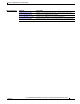
all Display both fan and temperature environmental status.
fan Display the switch fan (1) and fan (2) status.
temperature Display the switch temperature status.
| begin (Optional) Display begins with the line that matches the expression.
| exclude (Optional) Display excludes lines that match the expression.
| include (Optional) Display includes lines that match the specified expression.
expression Expression in the output to use as a reference point.
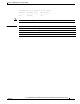
Release Modification
12.2(25)SE1 This command was introduced.